Step by step
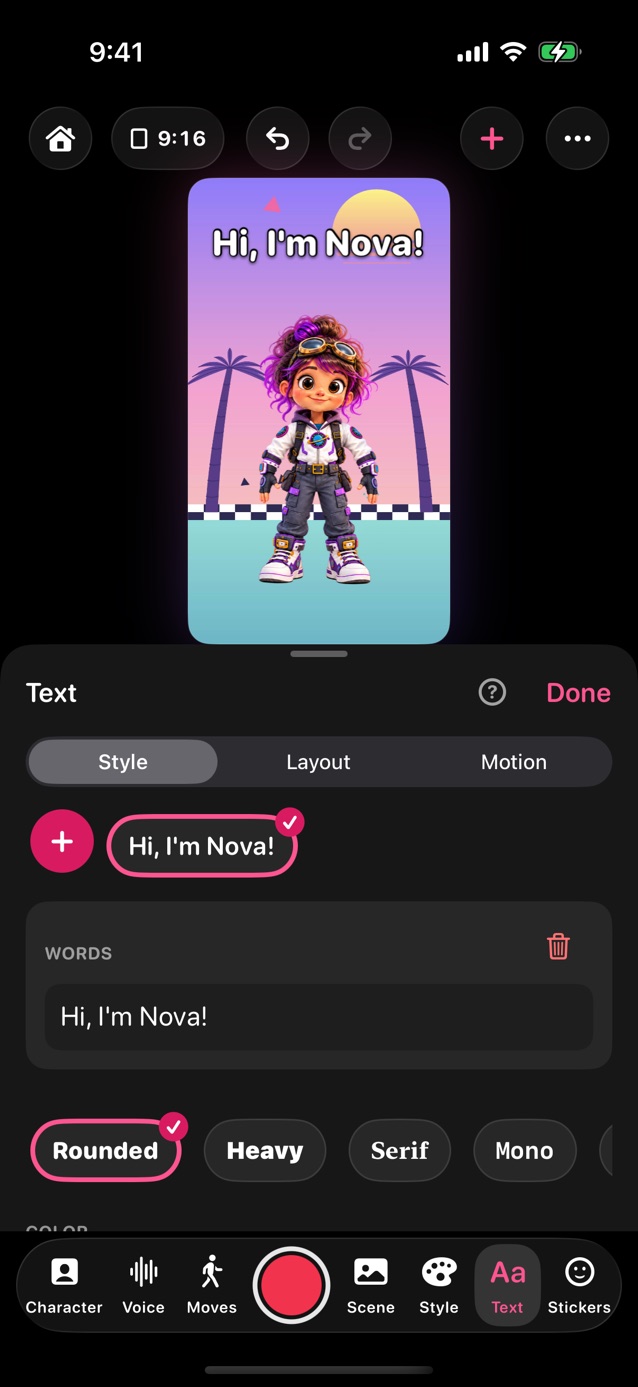
- In Pro Studio, tap Text in the dock. In Quick, Conversation and Story, switch to Format or Studio first.
- Under Add, tap a style. Type your words, then drag the text on the stage to place it.
- Tap a text on the stage, or its name in the panel, to edit it. Its words are in a box with Delete beside them; Style, Layout and Motion are at the top of the panel.
- Reset, at the top, puts the open tab back to the plain settings; your words and where they sit stay.
- Style: font, color, outline, size, shadow and a box behind the words. Layout: behind, on or in front of the character, align, spacing and rotation.
- Line style, in Layout: Normal, Dynamic (each line grows or shrinks to the same width) or Vertical (letters stack top to bottom, one column per line).
- Motion: animations like Pop in and Bounce (Plus).
- Ticker, under Add, scrolls your words along the bottom like a news crawl. Pair it with the Breaking News frame.
- Note puts the words on a white card. For a speech bubble with a tail, tap Speech bubbles are in Stickers, under Add.
Related
Still stuck? Email hello@yipyappy.com with your device and what happened.