
Step by step
- New to YipYappy? On the last welcome screen, tap Make my first clip. Already set up? Go to You › How to › Make your first clip.
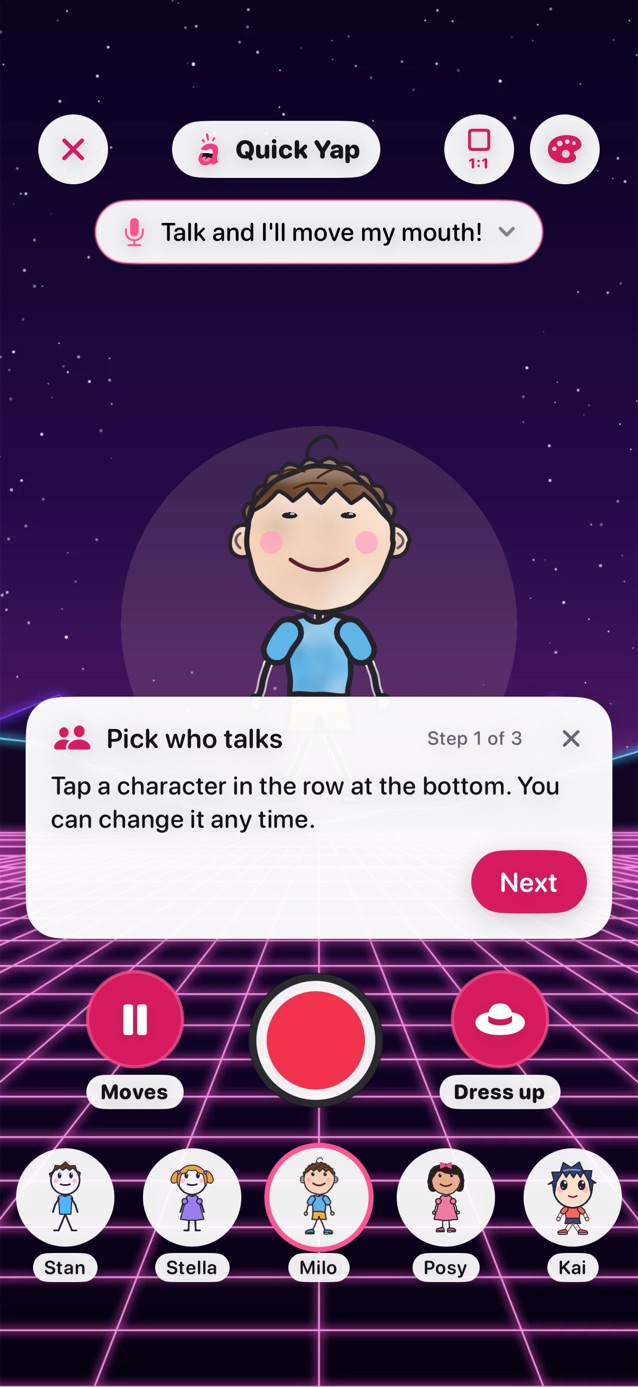
- Quick Yap opens with a card that shows each step. Step 1: tap a character in the row at the bottom.
- Step 2: say something and watch the mouth move. Rather type? Tap the bar at the top and choose Type.
- Step 3: tap the big red button. After 3, 2, 1, talk for about 10 seconds, then tap it again to stop.
- Your clip opens to preview. Tap Done, then Open Clips to find it any time.
- Next time, tap the book at the top of Quick Yap to tell a story in three parts: a beginning, a middle and an end.
- The card moves on by itself as you go. Tap × to close it at any step.
Related
Still stuck? Email hello@yipyappy.com with your device and what happened.